50 US States - American Quiz
- 4.5
- Rating
- 500.00K
- Installs
- Free
- Price
 Analysis by App-foxy
I enjoy trivia games that teach something concrete instead of relying only on quick guesses, and 50 US States - American Quiz fits that preference well. It turns the geography of the United States into short practice sessions focused on state names, capitals, flags, and maps. I found it most useful when I wanted a simple way to study a little at a time, rather than sit through a long lesson or search through a textbook.
This is a free trivia game from Andrey Solovyev, rated 4.5 on average from around 5.4 thousand ratings and supported by more than 500 thousand installs. Those figures suggest that it has found a steady audience among learners, families, and casual quiz players. The Everyone age rating also makes it approachable for younger users, although the best experience still depends on whether the player enjoys repetition and memorization.
How the current quiz experience feels
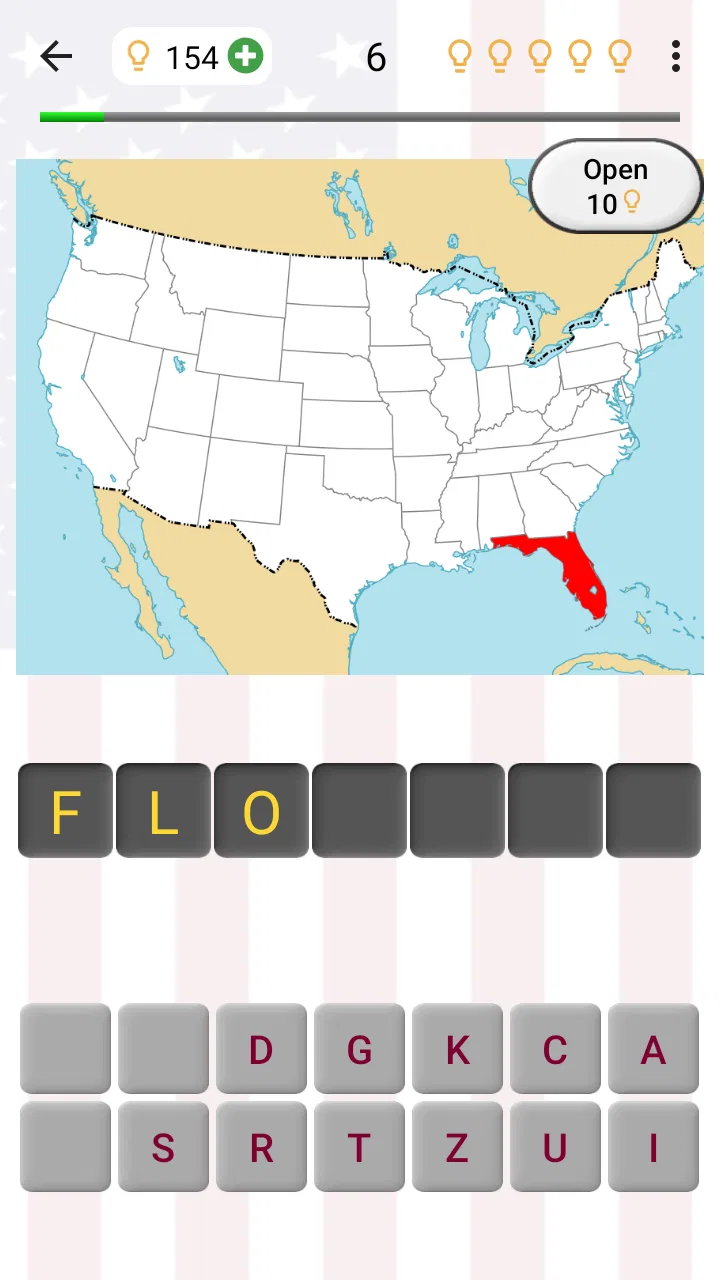
The central idea is straightforward: learn the states through questions connected to their capitals, flags, and locations. That combination matters because each subject tests a different kind of memory. A capital question asks you to recall a name, a flag question makes you notice visual details, and a map question connects the answer to a physical place. I like that the game does not treat American geography as a list of isolated facts.
You May Also Like

 Blood Strike: 2.5 Anniversary
Blood Strike’s Loadouts Turn Every Drop Into a Tactical Gamble
A close look at Blood Strike’s custom loadouts: how fast access to signature weapons reshapes its battle royale rhythm, rewards preparation, and narrows the gap between fights.

 Pandora - Music & Podcasts
Pandora’s Music Is Easy to Start, but Harder to Recover
Pandora’s strength is its low-effort path from a seed to a station. Its weak spot is how much confidence it asks you to place in connection, setup, and quiet recovery.

 8 Ball Pool
 Is Built on Rivalries, Rematches, and Routine
A close look at the rivalries, rematches, shared routines, and unanswered safety questions that turn a quick pool match into a persistent mobile community.

 Samsung Music
’s Quiet Strength Is Playing What You Already Own
Its reach comes less from spectacle than from dependable access to a personal library. That simplicity is both the app’s strongest retention engine and its ceiling.

 AccuWeather: Weather Radar
AccuWeather Review: A Quick, Clear Forecast for Everyday Decisions
For everyday plans, the best forecast is the one you can understand quickly. AccuWeather makes rain timing, radar, and local conditions easy to act on, with a few trade-offs.

 Hill Climb Racing
Why Hill Climb Racing Still Turns Crashes Into One More Run
A tiny car, a bumpy hill and one more upgrade: Hill Climb Racing keeps resurfacing because its simple chaos makes every near-miss feel personal.
More From Our News Desk
View All News


In practice, I would use it in short bursts. A few rounds during a commute, while waiting for an appointment, or before a school study session feel more natural than trying to finish everything in one sitting. The format is particularly suitable for repeated review: a state that seems obvious on a map may still be difficult when its capital appears without any visual help.
The game’s strongest quality is its narrow focus. It is not trying to become a general knowledge platform with questions about history, science, entertainment, and sports. Every session stays connected to the same learning goal. That makes it easier to understand what you are practicing, and it also means the app can feel repetitive if you are looking for broad trivia variety.
Why the four topics work better together
Studying capitals alone can become a pure memorization exercise. Studying flags alone can turn into a visual matching task. Adding maps gives the information context. When I connect a capital with the state’s position and flag design, the fact becomes easier to retrieve later because it has more than one mental cue.
A useful personal routine is to change the kind of attention you give each round. For map questions, I focus on neighboring states and the overall outline. For flags, I look for colors, symbols, and patterns rather than guessing from a vague impression. For capitals, I say the answer quietly before selecting it. That small pause helps expose whether I really know the answer or merely recognize it after seeing the choices.
This approach also reveals an important trade-off. The game can help build recognition and recall, but it is not a replacement for a full geography lesson. It gives you practice with the facts it presents; it does not automatically explain why a capital was chosen, how state borders developed, or how regional geography affects daily life. Users who want background stories will need another source alongside it.
What the latest version tells existing users
The current version is 3.6.0, while the game was released on September 2, 2014. That long span suggests a product that has remained available through several generations of mobile devices rather than disappearing after a brief launch. I see that as a positive sign for accessibility, especially for someone looking for a familiar, focused study tool instead of a constantly changing social game.
At the same time, a current version number by itself should not be mistaken for a complete redesign. The confirmed version tells me which build users should expect now, but it does not justify assuming that every part of the experience has been modernized. My practical advice is to approach it as an established quiz utility: useful for its subject matter and format, but not necessarily aimed at people who expect elaborate presentation or the newest competitive systems.
The minimum operating system is Android 6.0, which keeps the compatibility requirement relatively accessible for many older devices. That is helpful if you are installing it on a spare phone for a child or using an older handset for study. Still, compatibility is only one part of the decision. Screen size, touch accuracy, and the comfort of reading map-based questions will affect the experience more than the age of the phone alone.
There is no need to pay before trying the basic experience because the game is free to install. Optional in-app purchases range from $0.99 to $5.99 per item. I would treat that as a reason to explore the free version first and decide whether the learning format genuinely suits you. For a short-lived curiosity, spending money would make little sense; for a learner who returns regularly, an optional purchase may be easier to justify if it improves the specific way they want to practice.
How it affects people who already know some geography
Players with a basic knowledge of the states may find the early questions comfortable, but that does not make the app useless. In my experience, familiar facts are valuable as warm-up material because they reveal weak spots without creating immediate frustration. The more interesting test comes when similar-looking flags, less familiar capitals, or geographically confusing states appear together in memory.
I would not use the game as a one-time test of intelligence. A missed answer is more useful when it becomes a review target. After getting one wrong, I would repeat the state aloud, connect it to its location, and then return to it later instead of immediately rushing into another round. This turns a casual quiz into a lightweight spaced-practice habit, even though the app itself is not something I would describe as a full study planner.
For parents or teachers, the game can work as a quick activity before a larger lesson. A child might play a few rounds, write down unfamiliar capitals, and then use a paper map to locate those states. That combination is stronger than relying on screen recognition alone. The app supplies the prompt and repetition; the adult can add explanation, pronunciation help, and real-world context.
For adults preparing for a move, road trip, classroom discussion, or citizenship-related study, the value is similarly practical. I would use it to identify what I do not remember, not to claim that a high quiz score equals complete geographic knowledge. It is especially handy when you need a low-effort refresher and do not want to assemble flashcards manually.
Where it compares with ordinary alternatives
Compared with paper flashcards, the game is quicker to start and more visually engaging because flags and maps can be tested directly. Flashcards still have an advantage when you want complete control over the order, write personal notes, or force yourself to produce an answer without seeing multiple-choice cues. I would choose the app for convenience and flashcards for deliberate, customized revision.
Compared with a general trivia game, this title is more focused and therefore more useful for a specific goal. A broad quiz may be more entertaining after several sessions, but it can scatter your attention across unrelated facts. Here, every question contributes to the same subject. The downside is that users seeking variety, competition, or surprise topics may lose interest sooner.
Compared with an interactive atlas, the quiz offers a lighter commitment. An atlas is better for exploring borders, regions, and spatial relationships at your own pace. This game is better when you want to be prompted and tested. I would use an atlas to understand the country and this quiz to check whether the names, capitals, flags, and locations are sticking.
Compared with video lessons, the game demands more active recall. A video can explain a topic smoothly, but it is easy to watch without remembering much afterward. The quiz makes me commit to an answer, which exposes gaps faster. On the other hand, video or written material is better for explanations, historical context, and a guided learning sequence.
Small techniques that make practice more effective
One non-obvious benefit of the format is that it can expose different kinds of mistakes. If I miss a capital but recognize the map instantly, the problem is probably name recall. If I know the capital but confuse the map, I need spatial practice. If the flag is the issue, I should study visual structure rather than reread a list. Separating mistakes this way prevents vague studying and makes each short session more purposeful.
Another useful technique is to avoid playing only when you feel confident. Familiar questions create a comfortable rhythm, but they do not necessarily improve weak areas. I prefer alternating a normal round with a deliberate review of states I regularly confuse. That creates a better balance between motivation and challenge, especially for learners who tend to quit when every question feels difficult.
A third insight is to use the game as a conversation starter rather than a solitary score chase. With a child, one person can answer the capital while another identifies the state on a map. With friends, players can explain how they remembered a flag or why a location was surprising. The quiz gives the group a clear prompt, while the discussion adds the context the app itself does not provide.
It also helps to separate recognition from recall. Multiple-choice questions can make a fact feel familiar because the correct answer is visible among the options. To test yourself honestly, cover the choices briefly or say your answer before looking closely at them. That simple habit gives a more accurate picture of what you know and reduces the risk of confusing recognition with memory.
Limitations worth considering before installing
The focused design is also the main limitation. Once you have practiced the same set of subjects repeatedly, the experience may feel predictable. That is not a flaw for someone who wants repetition, but it is a real drawback for players who expect new content every time. I would skip it if my main goal were a constantly expanding trivia library.
The app also asks the player to supply much of the learning discipline. A quiz can show whether an answer is right or wrong, but meaningful improvement depends on what you do afterward. If you simply tap through rounds and chase a feeling of progress, difficult capitals or locations may remain weak. The best results come from pausing, reviewing errors, and returning later.
Map-based learning can be less comfortable on a small screen, particularly for users with visual difficulties or older devices. The minimum operating system requirement may be manageable, but hardware usability still matters. Before committing to long sessions, I would try a few questions and check whether the state shapes, labels, and flag details are easy for me to distinguish.
The purchase model is another consideration. The game is free, but optional items cost between $0.99 and $5.99. That is not automatically a problem, yet it means families should be clear about whether they intend to use only the free experience or allow purchases. I would make that decision in advance rather than letting a child discover the purchase options during play.
Finally, the Everyone rating describes broad suitability, not a guarantee that the app matches every learner. Younger children may need help reading, remembering capitals, or understanding why an answer is correct. Older students may want more detailed explanations than a quiz format provides. The age label makes it approachable, but the learning level still depends on the player.
Who should use it and who should choose something else
I recommend it to beginners learning the states, parents looking for a short educational activity, adults refreshing forgotten geography, and trivia fans who prefer a clearly defined subject. It is also a sensible companion to a larger study plan because it makes recall practice easy to fit into spare minutes.
I would be more cautious recommending it to advanced geography students, players who need detailed lessons, or anyone who wants live multiplayer competition and a constantly changing question pool. An atlas, structured course, customized flashcard system, or broader trivia title may serve those needs better. Choosing another option is not a criticism of this game; it simply reflects the limits of a compact state-focused quiz.
If you are unsure, the free entry point makes the decision fairly simple. Try it during several short sessions rather than judging it after one enthusiastic round. Notice whether you remember missed capitals later, whether the flag questions help you notice visual differences, and whether the map practice feels clear on your device. Those answers matter more than the store summary because they reveal whether this particular learning style suits you.
What I would watch as the product continues
Because the game has been maintained through version 3.6.0 after its 2014 release, I would watch for signs that future development continues to improve clarity without distracting from the core subject. Better support for reviewing mistakes, clearer learning progression, or more flexible practice would be meaningful improvements for returning users. I would value those changes more than decorative additions.
I would also pay attention to how well the established format serves both newcomers and experienced players. Beginners need encouragement and repetition, while returning users need a reason to keep practicing once the basics feel familiar. A good balance would preserve the simple quiz identity while giving long-term learners more control over what they revisit.
For now, my view is positive but specific: this is not a complete American geography course, and it is not the most varied trivia game. It is a practical, focused way to test knowledge of state capitals, flags, and locations. Its real strength is turning a narrow study goal into a habit that fits into ordinary spare time.
50 US States - American Quiz is worth trying if you want an uncomplicated geography companion and are comfortable learning through repeated questions. I like it best as a supplement to maps, notes, or conversation, where the quiz supplies active recall and other materials supply explanation. For that purpose, the free game from Andrey Solovyev remains an approachable choice, with enough focus to be useful and enough limitations to make expectations important.
FAQs for 50 US States - American Quiz
01What is the main objective of 50 US States - American Quiz?
The main objective of the 50 US States - American Quiz is to test and enhance your knowledge about the 50 states of the United States. The app challenges users with questions related to state capitals, geographical locations, historical facts, and other state-specific trivia, making it both educational and entertaining.
02Is 50 US States - American Quiz suitable for all age groups?
Yes, the app is designed to be suitable for users of all age groups. It offers varying levels of difficulty, ensuring that both younger users and adults can enjoy and learn from the quiz. It’s a great tool for students, educators, and trivia enthusiasts seeking to improve their knowledge about U.S. geography.
03Does the app require an internet connection to function?
No, 50 US States - American Quiz does not require an internet connection to play. Once downloaded, the app can be accessed offline, allowing users to enjoy the quiz anytime, anywhere, without the need for continuous internet access. This makes it convenient for use during travel or in areas with limited connectivity.
04Are there any in-app purchases or ads in 50 US States - American Quiz?
The app is free to download and use, but it may contain ads to support the developers. There might also be optional in-app purchases available, such as removing ads or accessing additional content and features. Users can enjoy the basic functionality without making any purchases, though.
05Can progress be tracked across different devices?
Currently, 50 US States - American Quiz does not support cross-device progress tracking. Progress and scores are stored locally on the device. Users who switch devices will need to start over or manually track their progress. Future updates may include cloud saving features to address this limitation.
Pros
- Engaging and educational gameplay.
- Wide range of trivia questions.
- User-friendly interface.
- Regular updates with new content.
- Offline play is available.
Cons
- Limited customization options.
- Ads can be distracting at times.
- No multiplayer mode available.
- Some questions may repeat.
- In-app purchases for hints.

50 US States - American Quiz
Gallery